
DocsShip apps
Import from Compose, Heroku or Render
Bring apps over from a Docker Compose file, Heroku's app.json and Procfile, or Render's render.yaml, with their settings, databases, workers, jobs and release commands.
Already running on Heroku or Render, or with Docker Compose? OpsNexa Online reads the files already in your repository and sets the apps up the same way. You check everything before anything is created.
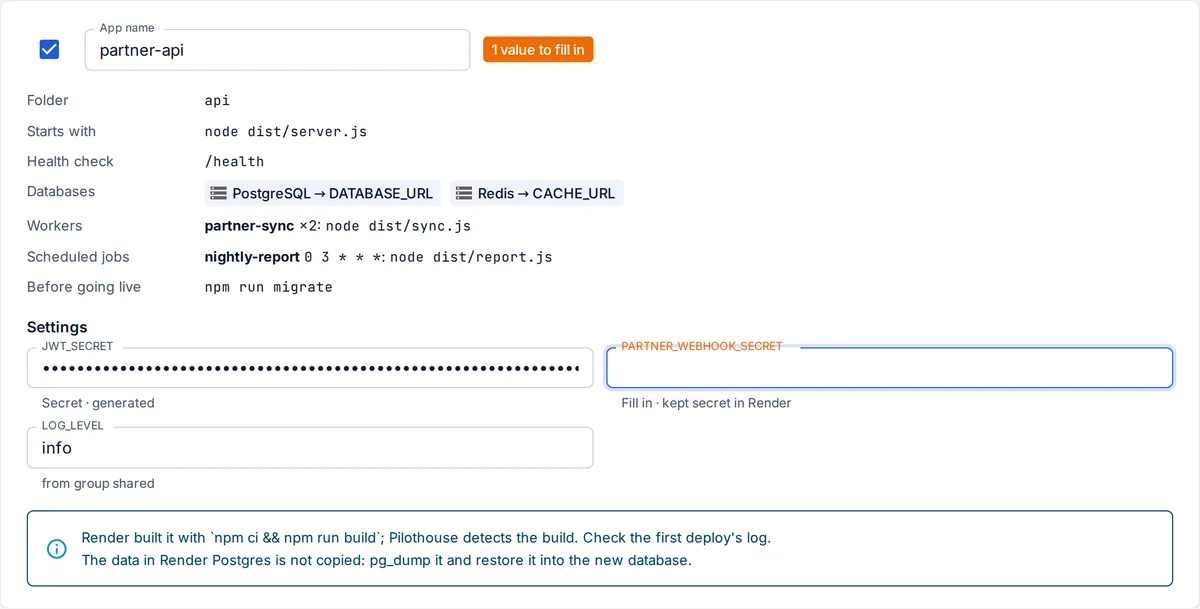
Import
- On Apps, press Import from Compose, Heroku or Render.
- Paste the repository’s address and press Read the repository.
- Pick a git account for a private repository.
- Choose the source if the repository has more than one; otherwise OpsNexa Online finds it.
- Check each app:
- rename it, or leave it out;
- fill in the settings marked Fill in.
- Pick the server the apps run on and who can open them.
- Press Create.
The apps are created, and deployed right away if every setting has a value. Otherwise, fill in the rest under the app’s Settings, then deploy.
What is brought over
| Docker Compose | Heroku | Render | |
|---|---|---|---|
| Apps | Services built from the repository (build:), each from its folder | The app in app.json | web and private services, from their rootDir |
| How it starts | command: | The Procfile’s web: line | startCommand |
| Port and health check | ports:, and a healthcheck URL | $PORT is set for the app | healthCheckPath |
| Settings | environment: | env in app.json; current values with an API key | envVars and env groups |
| Generated secrets | "generator": "secret" | generateValue: true | |
| Databases | postgres and redis services | Heroku Postgres and Heroku Redis add-ons | Databases, Redis and Key Value |
| Workers | Built services without ports in the same folder | Other Procfile processes, with their dyno counts | Background workers, with their instances |
| Scheduled jobs | Cron jobs | ||
| Before going live | The Procfile’s release: | preDeployCommand |
Database connection settings are filled in by OpsNexa Online. In Compose, a setting such as DATABASE_URL: postgres://…@db:5432/… that points at the db service gets the new database’s address. In Render, fromDatabase and fromService settings work the same way.
Release commands become deploy steps that run before the new version goes live.
What isn’t brought over
- Data. Databases start empty. Copy your data with
pg_dumpand restore it into the new database. - Volumes and disks. Files on them stay where they are. Keep files in a database or object storage.
- Other images. Prebuilt images and services like MySQL, MongoDB or RabbitMQ aren’t run by OpsNexa Online. Keep using a hosted one and add its address as a setting.
- Build commands. OpsNexa Online detects how to build the app. Check the first deploy’s log.
Every one of these is listed on the import page and in the result, so nothing is dropped silently.
Something unclear or missing? Tell us, or press the ? at the top of OpsNexa Online for the guide and tours inside the product.